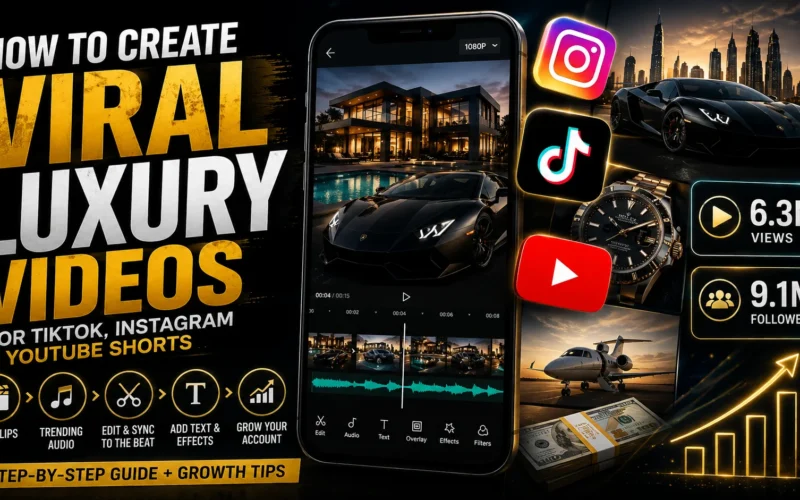
How to Create Luxury Aesthetic Videos for TikTok, Instagram & YouTube Shorts
Luxury-themed videos have been blowing up across YouTube, TikTok, and Instagram, and the interesting thing is that there is still plenty of opportunity to build an account around this type of content.
From supercars and luxury houses to money, travel, watches, business, and motivational lifestyles, this niche has the potential to attract a highly engaged audience. If you know how to find the right clips, pair them with trending audio, and edit everything into a consistent visual style, you can create impressive videos without expensive equipment or complicated editing.
In this guide, I’ll show you step by step how to create dark, aesthetic luxury videos from scratch. We’ll cover where to find clips, how to discover trending audio, how to edit everything using CapCut, and some practical growth tips you can use when publishing your videos.
Important: If you use clips from other creators, make sure you have the necessary rights or permission to use them. Simply downloading someone else’s video does not automatically give you permission to repost it. Whenever possible, use licensed, royalty-free, public-domain, or original footage.
Step 1: Find High-Quality Luxury Clips
The first part of creating luxury content is finding good footage.
You don’t necessarily need to record your own supercars, luxury homes, expensive watches, private jets, or exotic locations. There are several ways to source footage, but you should always pay attention to copyright and licensing.
Option 1: Use Free Stock Video Websites
One of the easiest approaches is to use legitimate stock footage platforms.
Websites such as Pexels, Pixabay, and Mixkit offer video footage that can be useful for social media projects. Always check the individual license terms before using a clip commercially.
You can search for terms such as:
- Luxury cars
- Supercars
- Lamborghini
- Ferrari
- Luxury house
- Dubai skyline
- Private jet
- Rolex watch
- Business lifestyle
- Money
- Yacht
- Luxury hotel
- City night
- First-class travel
The goal isn’t simply to collect random clips. You want footage that fits the overall identity of your page.
Option 2: Find Inspiration on TikTok and Instagram
Another way to research content is by browsing TikTok and Instagram.
Search for the type of content you want to create, such as luxury cars, watches, houses, travel, money, or motivational lifestyle content. Pay attention to which videos are performing well and study their editing style, hooks, pacing, captions, and audio choices.
However, there is an important difference between researching content and reposting content.
Don’t assume that because a video is publicly available on Instagram or TikTok, you’re free to download and upload it to your own account. Instead, use these platforms to understand what works and, where possible, recreate the concept using footage you have permission to use.
This can actually make your page more original.
Step 2: Find Trending Audio on Instagram
Once you have your footage, the next step is finding audio that fits the content.
For luxury videos, the audio can make a huge difference. A strong beat combined with fast cuts can make ordinary footage feel much more cinematic.
One simple way to discover audio is directly through Instagram.
Open the Explore page and look for Reels that match the type of content you’re creating.
For example, if you’re creating luxury lifestyle content, look for videos featuring:
- Supercars
- Luxury watches
- High-end travel
- Business motivation
- Wealth
- Expensive homes
- Night-time city scenes
When you find a Reel with an audio track that fits your style, tap the audio name at the bottom of the Reel.
Instagram will show you information about that audio and other Reels using it.
Look for audio that appears to be gaining popularity. Trending indicators can help you identify sounds that are currently being used by more creators.
The key is not to blindly select the most popular sound. Try to find audio that is both relevant to your niche and currently gaining momentum.
You can also save promising audio so you can return to it later.
Step 3: Download or Source the Audio Legally
For editing purposes, you may want to work with the audio separately inside your editing software.
However, be careful when downloading audio from social media platforms. Music and audio tracks can be copyrighted, and availability can vary by country and platform.
A safer approach is to use music and sounds available through the platform’s own music library or properly licensed music services.
For Instagram, you can also build your edit around the timing and structure of a trending sound, then select the appropriate audio directly inside Instagram when you publish.
This gives you the editing advantage of working to a specific rhythm while keeping the publishing process aligned with the platform.
Step 4: Edit Everything in CapCut
Now comes the fun part: putting the clips together.
For this example, we’re using CapCut because it is accessible and relatively easy to learn. If CapCut isn’t available where you live, you can use practically any modern video editor that supports timelines, audio, text, filters, and transitions.
Start by creating a new project and importing your audio or reference video.
If you’ve imported a video specifically to use its audio as an editing reference, you can extract the audio and then remove the original video.
Now you have your soundtrack on the timeline.
Edit According to the Beat
This is one of the most important parts of creating this style of video.
Don’t simply throw seven random luxury clips onto a timeline.
Instead, listen to the audio and identify:
- Beat changes
- Drops
- Pauses
- Strong transitions
- Faster sections
- Slower sections
Then place your clips around those moments.
If the music suddenly changes or the beat drops, that’s a perfect opportunity to switch from one clip to another.
This creates the feeling that the visuals and music were designed together.
Step 5: Add Your Luxury Clips
Now import your selected footage.
For example, you could use seven clips featuring:
- A supercar
- A luxury house
- A private jet
- An expensive watch
- A yacht
- A luxury hotel
- A city skyline
Don’t worry if every clip isn’t perfect.
Try different combinations and remove anything that doesn’t fit the overall aesthetic.
The objective is to create a consistent visual story rather than simply showing expensive objects.
You can also combine different categories.
For example:
Supercar → Dubai skyline → Watch → Private jet → Luxury house → Yacht
That sequence feels much more intentional than using seven unrelated car clips.
Step 6: Keep the Text Minimal
Now it’s time to add text.
If your video contains spoken words, CapCut’s Auto Captions feature can help generate captions automatically.
For a luxury aesthetic page, however, you generally don’t need huge amounts of text.
Minimal typography often works better.
Try short phrases such as:
“Build the life you dream about.”
“Discipline creates freedom.”
“Think bigger.”
“Your future is built today.”
Keep the typography clean and readable.
Avoid adding excessive glowing text, giant animations, or too many different fonts. Luxury content generally benefits from a more premium and minimalist visual identity.
If you use animations, choose subtle ones that complement the footage instead of distracting from it.
Step 7: Create a Dark Luxury Aesthetic
This is where you can give the entire video its identity.
A darker color treatment can make luxury footage feel more cinematic and premium.
Inside your editing software, experiment with filters, brightness, contrast, shadows, saturation, and other adjustments.
You don’t need to make the video extremely dark.
The goal is to create a consistent look where:
- The footage feels cinematic
- The text remains easy to read
- Highlights aren’t blown out
- Different clips look like they belong together
Once you’ve found a look that works, save it as your standard style.
This is important if you’re building a theme page.
You want someone to see one of your videos and eventually recognize that it came from your account.
Step 8: Add Your Branding
A simple logo or brand name can help make your videos more recognizable.
For example, you could place your logo or page name at the end of the video.
Keep it subtle.
You don’t want the branding to cover half the screen or distract from the content.
A simple ending such as:
YOUR BRAND
or
@YOURHANDLE
can be enough.
Over time, consistency in your typography, colors, editing style, captions, and branding can help turn a collection of videos into an actual content brand.
Step 9: Use Trending Audio When Publishing
Here’s an important distinction.
You might use a trending sound while editing simply because you need to understand its timing and rhythm.
But when you’re actually publishing your Reel, you should consider selecting the relevant audio directly through Instagram’s audio feature where appropriate.
This can help ensure the post is associated with the correct sound on the platform.
The exact impact of trending audio can change as Instagram’s recommendation system evolves, so don’t treat it as a guaranteed growth hack.
Your content still needs to be interesting enough to make people stop scrolling.
Step 10: Experiment With Instagram Effects
If you’re running a new account, you can also experiment with effects and other creative tools available inside Instagram.
Some effects will have little impact, while others may be popular at a particular moment.
Browse the Explore and Reels sections to see what creators in your niche are currently using.
Don’t add an effect just because it’s available.
Ask yourself whether it actually improves the video.
If it makes the footage look worse, skip it.
Step 11: Write Better Captions
Your caption doesn’t need to be complicated.
Try to add something useful or interesting rather than simply writing:
“Follow for more.”
For example:
The lifestyle you want starts with the habits you build today. What would your dream life look like?
Then you can add your account handle and relevant hashtags.
For a luxury motivational video, your hashtags might include:
#Luxury #LuxuryLifestyle #Motivation #Success #Mindset #Wealth #Entrepreneur
Don’t overload your caption with dozens of unrelated hashtags. Keep them relevant to the actual video.
Step 12: Choose a Strong Thumbnail
Your first frame isn’t always the best thumbnail.
If the opening clip is blurry, dark, or visually confusing, people may be less interested in clicking or engaging with the video.
Choose a frame that immediately communicates the subject.
A clean shot of a supercar, luxury interior, skyline, watch, or other visually impressive subject can work much better.
The thumbnail should make someone understand the theme of the video within a second.
Bonus Growth Tips for Luxury Theme Pages
Creating the video is only one part of the process.
If you want to build a real account, consistency matters.
1. Pick a Clear Niche
Don’t make one video about Lamborghinis, another about dogs, another about gaming, and another about cooking.
Start with a clear identity.
For example:
Luxury + Motivation
or
Luxury Cars + Lifestyle
or
Wealth + Business Motivation
A focused theme makes it easier for the audience and recommendation systems to understand what your account is about.
2. Develop a Repeatable Editing Style
Create a template that you can reuse.
For example:
Hook → Luxury Clip → Beat Drop → Text → Fast Clips → Logo
Once you have a repeatable system, you can create videos much faster.
3. Test Different Hooks
The first one or two seconds are extremely important.
Instead of starting with a random clip, experiment with hooks such as:
- “POV: You finally made it.”
- “The life you’re working for.”
- “This is what financial freedom looks like.”
- “Your future could look like this.”
- “Stop waiting. Start building.”
Test different styles and see which ones generate better retention.
4. Focus on Retention
Views are important, but retention is even more useful for understanding whether your content is working.
If people leave immediately, ask yourself:
Was the first clip strong enough?
Was the hook interesting?
Did the video move too slowly?
Was the text difficult to read?
Did the clips match the music?
Use the analytics provided by each platform to understand what is happening.
Instagram provides creator analytics through its professional tools, while TikTok and YouTube also provide detailed performance data.
You can learn more about Instagram’s creator resources through the official Instagram Creators website.
For TikTok, check the TikTok for Business resources.
You can also explore YouTube’s official Creator resources if you’re planning to repurpose your content as YouTube Shorts.
Can Luxury Theme Pages Still Grow?
Yes, there is still an opportunity, but the easy version of this strategy is becoming increasingly crowded.
Simply downloading other people’s videos, adding a trending song, and reposting them is not a sustainable content strategy.
The better approach is to use the same basic concept while creating something genuinely different.
Find properly licensed footage, develop your own editing style, write original captions, create unique hooks, and build a recognizable brand.
That’s what can turn a simple theme page into a real content business.
Final Thoughts
Creating luxury aesthetic videos doesn’t have to be complicated.
You need good footage, suitable audio, a simple editing workflow, consistent branding, and a willingness to test different ideas.
The basic process looks like this:
Find quality footage → Choose suitable trending audio → Edit to the beat → Add minimal text → Apply a consistent luxury filter → Add branding → Choose a strong thumbnail → Publish and analyze the results.
The biggest mistake is spending weeks trying to create the “perfect” video before posting anything.
Start creating.
Test different luxury clips, hooks, music styles, captions, and editing techniques. Then use your analytics to figure out what your audience actually responds to.
And remember: trends can help you get attention, but originality and consistency are what can help you build a recognizable account over time.
If you enjoyed this guide, keep experimenting and keep improving your editing. With the right content strategy, even simple clips can be transformed into professional-looking luxury videos.